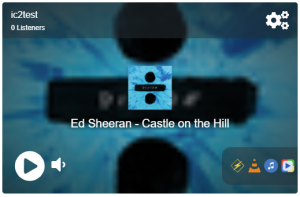
The audio player is compatible with all modern browsers, it supports native HTML5 and SSL streaming and comes in 3 different sizes: Large, Small and Compact. The player is available only with the MediaCP software and it cannot be used with external streams outside of the MediaCP.
The Audio Player includes the following primary features:
- Automatic Album Cover Art
- Fallback custom background where a relative image cannot be located or cover albums are disabled
- Direct Player Links
- Mount Point Selection
- Listener Count
- Domain Restrictions – Play only on specific websites
Autoplaying a stream is a complicated process with modern browsers, since the Chrome engine implemented Autoplay Policy Changes which prohibit a stream from autoplaying unless certain conditions are made
The policy specifies that autoplay is only possible where:
- The audio is muted; or
- The user has engaged with the website before autoplay starts; or
- The user has previously played media on the website with sound.
Because of these restrictions, it does not make a lot of sense to start an audio-only stream muted; because it will confuse the user visiting the website.
We have implemented an “Attempt Autoplay” option which will automatically attempts to play the broadcast on load of the player at 50% volume. This will require visitor prior interaction (click, tap, previous visit with play, etc.) so that it meets the above conditions.
The Audio Player streams the default Mount Point URL as defined in the MediaCP so it is important that you are broadcasting to the same Mount Points that are listed in the Mount Points configuration.
When more than one mount point is specified, the player will show a dropdown selection allowing the user to change to a different stream. This can be useful for providing multiple bitrate streams.
Album covers are displayed on the stream by default. The image is sourced from an online directory. If an image is not available, the configured Player Background will be displayed instead.
It is possible to disable Album Covers from the Player Configuration, by unchecking the Covers item from Display Options.

Player Configuration
It is possible to access the player configuration while logged into the MediaCP. You will see the configuration icon available on the player itself.